
Mastering React Hooks
Explore the most commonly used React Hooks with real-world examples you can apply immediately.
December 26, 2025
Get a quick audio overview of this article.
Hooks are functions that provide React features to function components. They always start with the use keyword. We can use either built-in hooks provided by React or create our own custom hooks.
eg:- useState,useEffect etc...
React Hooks can be categorized based on the problems they solve.
Below are some commonly used hook categories that are very useful in real-world projects:
-
(i).For State Management
-
(ii).For Handling Side Effects
-
(iii).For DOM Manipulation
-
(iv).For Handling Global State
-
(v).For Handling Lifecycle Events
State is simply the current snapshot of a component. It allows a component to remember information and use it later.
For example, the email or phone number of the current user can be stored in state so that the component can access and use it whenever needed.
State helps components become dynamic and interactive.
State Management Hooks in React.
To manage state in React, we mainly use two hooks:
- (1). useState
- (2). useReducer
1. useState Hook
useState is a React Hook that allows us to add a state variable to a functional component.
Syntax
const [name, setName] = useState(initialValue);
How useState Works
The useState returns an array with two elements
- (i) The current state value
- (ii) The setter function used to update the state
when the setter function is called React
- (i) Updates the state
- (ii) trigers re-render with the updated state
// eg:
const [email, setEmail] = useState("")
2. useReducer Hook
useReducer is another React Hook used for state management.
It is especially useful when:
- (1) State logic is complex
- (2) Multiple state values are related
- (3) State updates depend on previous state
This hook allows us to use a reducer function inside a component.
What is a Reducer?
- A reducer is a function that defines how the state should be updated based on an action.
In simple words
- Reducer ek function hota hai jisme hum batate hain ki state kaise update hogi.
// syntax
function reducer(state, action) {
  // logic to update state
  return newState;
}
const[state,dispatch]=useReducer(reducer,initialState);
How useReducer Works
The useReducer hook returns an array with two values:
- (i). The current state
- (ii). A dispatch function
dispatch Function?
- dispatch is a function used to send an action object to the reducer.
Reducer Function Details
The reducer function always takes two arguments:
- (i). state –> the current state
- (ii). action –> an object that describes what should happen
The reducer must always return a new updated state and should never modify the existing state directly.
function reducer(state, action) {
  switch (action.type) {
    case "increment":
      return state + 1;
    case "decrement":
      return state - 1;
    default:
      return state;
  }
}
Summary
- State allows components to remember data useState is best for simple state values useReducer is best for complex state logic. Both hooks help manage state and trigger re-renders efficiently
1{/* use State exmaple */}
2import { useState } from "react";
3
4export default function App() {
5  const [name, setName] = useState("");
6  function handleName(newName) {
7    setName(newName);
8  }
9  return (
10    <div className="App">
11      <h1>{name}</h1>
12      <button onClick={() => handleName("Akarsh")}>Set Name</button>
13    </div>
14  );
15}1// use reducer exmaple
2
3import { useReducer } from "react";
4
5function reducer(state, action) {
6 if (action.type === "NAME_CHNG") {
7 return action.newName;
8 }
9}
10
11export default function App() {
12 const [state, dispatch] = useReducer(reducer, "");
13 return (
14 <div className="App">
15 <h1>{state}</h1>
16 <button
17 onClick={() => dispatch({ type: "NAME_CHNG", newName: "Akarsh" })}
18 >
19 Set Name
20 </button>
21 </div>
22 );
23}Handling side effects means doing tasks like fetching data, setting up subscriptions, or manually manipulating the DOM inside a component.
To handle side effects in React, we use the useEffect hook.
useEffect Hook
useEffect is a React hook that helps us handle side effects in a component. It allows us to run certain code after the component renders.
Basically, after using this hook, you are telling React: “Bhai, component render hone ke baad ye particular code chala dena.”
useEffect Takes Two Things
- A function
- An optional dependency array
The function passed to useEffect runs: after the component renders, or after a state/value changes (if specified in the dependency list).
Variations of useEffect
there are three common variations of the useEffect hook:
Without Dependency Array
useEffect(fn)
The function (fn) runs:
- once on the initial render
- and after every state change inside the component
With Empty Dependency Array
useEffect(fn, []);
The function runs:
- only once after the initial render
This is commonly used for:
- API calls
- setting up subscriptions
- one-time logic
With Dependency Array
useEffect(fn, [name])
The function runs:
- on the initial render
- every time name (state or prop) changes
Common Use Case
A very common use case of useEffect is fetching data from a backend or API after the component renders and then hydrating the component with the fetched data.
1// use Effect exmaple
2
3import { useEffect, useState } from "react";
4
5export default function App() {
6  const [posts, setPosts] = useState([]);
7  const fetchData = async () => {
8    const res = await fetch("https://jsonplaceholder.typicode.com/posts");
9    const data = await res.json();
10    setPosts(data);
11  };
12
13  useEffect(() => {
14    fetchData();
15  }, []);
16  return (
17    <div className="App">
18      <div>
19        {posts.length < 0 ? (
20          <p>No Posts Found</p>
21        ) : (
22          posts.map((post) => {
23            return (
24              <div>
25                <h2
26                  style={{ height: 150, width: 100, border: "2px solid black",padding:"10px",fontSize:"15px" }}
27                >
28                  {post.title}
29                </h2>
30              </div>
31            );
32          })
33        )}
34      </div>
35    </div>
36  );
37}React automatically updates the DOM to match our render output, so we don’t have to worry about manually manipulating the DOM every time. However, there are certain situations where we do need direct access to DOM elements managed by React for example:
-
- Focusing an input element
-
- Scrolling an element into view
-
- Measuring element dimensions
To perform such tasks, React does not provide a direct declarative way. Instead, we need a reference to the DOM element. For this purpose, React provides a hook called useRef.
What is useRef?
The useRef hook is mainly used for accessing and manipulating DOM elements. It can also be used to store mutable values that:
-
- Persist across renders
-
- Do not trigger a re-render when updated
This makes useRef useful when you want to store values that should survive re-renders without affecting the UI.
const myRef = useRef(null);
How useRef Works
-
- useRef returns an object with a single property called current.
-
- Initially, current is set to the value passed to useRef (usually null)
-
- Once the component is rendered and the DOM node is created, React assigns the DOM element to myRef.current.
Attaching a Ref to a DOM Element
To get a reference to a DOM element, pass the ref object to the element using the ref attribute:
<div ref={myRef}>Hello</div>
Now, myRef.current points to this <div> element.
Manipulating the DOM
Once you have access to the DOM element, you can call DOM methods directly:
myRef.current.scrollIntoView();
This allows you to perform actions like scrolling, focusing, or measuring elements when needed.
1// use Ref exmaple
2// focus the input node.
3
4import { useEffect, useRef, useState } from "react";
5
6export default function App() {
7  const myRef = useRef(null);
8  return (
9    <div className="App">
10      <div
11        style={{
12          display: "flex",
13          justifyContent: "center",
14          alignItems: "center",
15          gap: "10px",
16        }}
17      >
18        <input ref={myRef} type="text" />
19        <button onClick={() => myRef.current.focus()}>Focus Input</button>
20      </div>
21    </div>
22  );
23}We discussed state handling in Section 3 using the useState and useReducer hooks.
However, these hooks are used within a single component, so they are not ideal for sharing state across multiple components.
To handle and sync state across different components, we need global state management.
To achieve global state, we use the useContext hook.
Why not props?
The useContext hook is a React hook used to send state or data to child components.
You might think this can also be achieved using props:
<OtherComponent data={someData} />
ComponentA → ComponentB → ComponentC → ComponentD
In this case, we must pass props at every level, even if intermediate components don’t need the data. This problem is known as prop drilling.
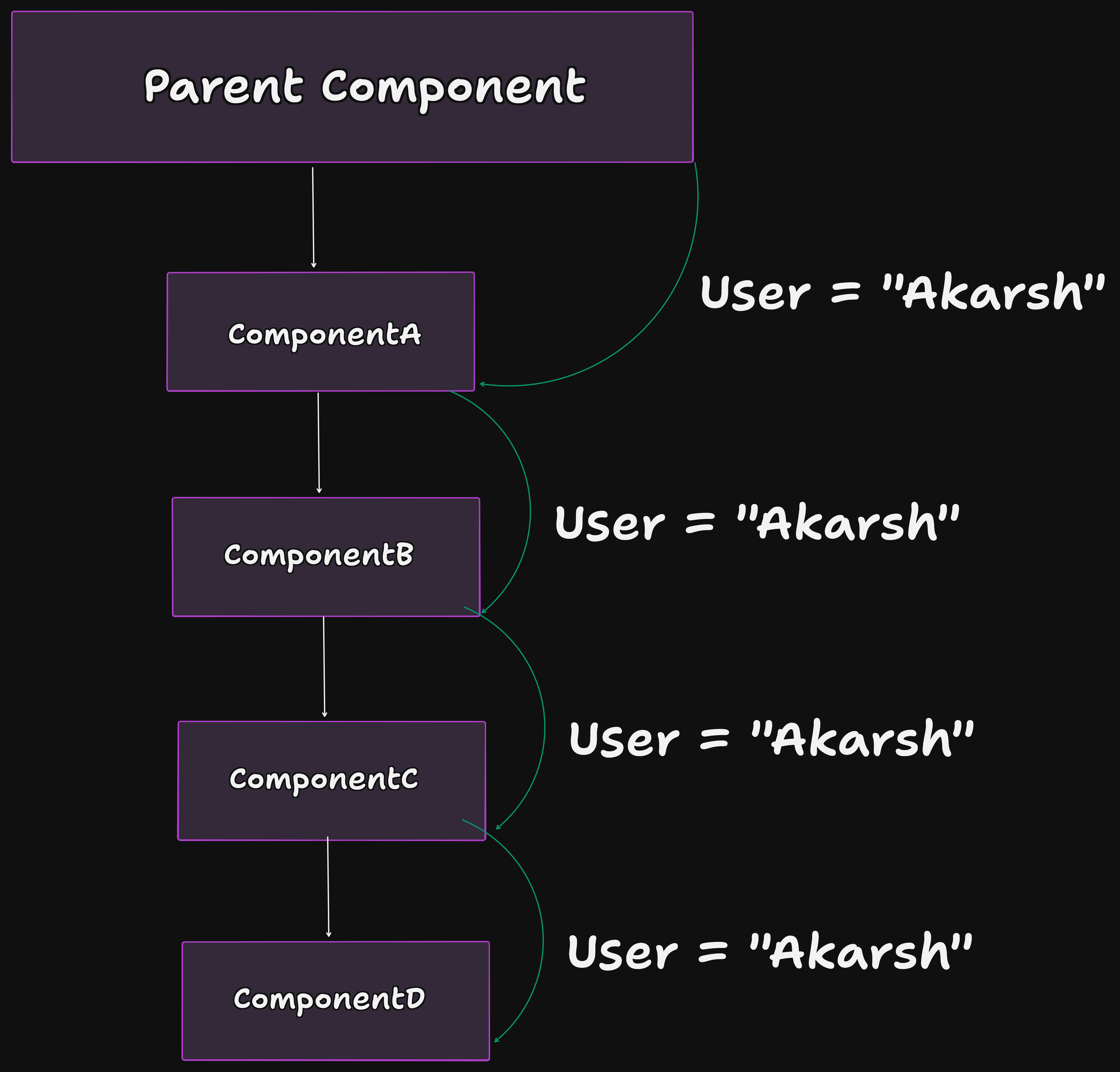
The above image shows how props must be passed to each child component when components are deeply nested.
Solution: useContext
To avoid prop drilling, we use the useContext hook. useContext allows us to provide state or values to child components without passing props manually at every level.
Key Concepts of Context API
- Whenever we implement Context, we think about two main things:
-
- Context Provider – Holds and provides the state/value
-
- Context Consumer – Consumes the data provided by the parent.
The Provider is always a parent component
The Consumer can be any child component below it.
Basic Example
1️⃣ Creating a Context Provider
import { createContext } from "react";

export const UserContext = createContext();

<UserContext.Provider value={name}>
  <ChildrenComponent />
</UserContext.Provider>
2️⃣ Consuming Context Data
import { useContext } from "react";
import { UserContext } from "./UserContext";

const user = useContext(UserContext);
This way, any child component can directly access the data without prop drilling.
1// 1. Context Provider
2
3import { createContext, useState } from "react";
4import ChildrenComponent from "./ChildrenComponent";
5
6// create Context
7export const userContext = createContext();
8
9export default function App() {
10  const [user, setUser] = useState("Akarsh");
11
12  return (
13    <div className="App">
14      {/* wrap the children Component with userContext.provider and send the state/value you want */}
15      <userContext.Provider value={user}>
16        <ChildrenComponent />
17      </userContext.Provider>
18    </div>
19  );
20}1// consumer of context wala component.
2import { useContext, useState } from "react";
3import { userContext } from "./App";
4
5export default function ChildrenComponent() {
6 const user = useContext(userContext);
7 return (
8 <div>
9 <h2>{`Data From Parent Without props :- ${user}`}</h2>
10 </div>
11 );
12}Lifecycle Events refer to the different stages a React component goes through—from creation, to updates, and finally removal from the DOM. These events allow developers to run specific code at key moments in a component’s life, such as when it is first created or just before it is removed.
- Mounting
Mounting occurs when a component is rendered for the first time and inserted into the DOM. This phase is commonly used for:
-
- Initializing state
-
- Making API calls
-
- Setting up subscriptions or timers
- Updating
Updating happens when a component is re-rendered due to:
-
- Changes in state
-
- Changes in props received from a parent component
This phase allows you to react to data changes, re-fetch data, or perform side effects based on updated values.
- Unmounting
Unmounting occurs when a component is removed from the DOM tree. It is typically used for cleanup tasks such as:
-
- Clearing timers
-
- Cancelling API requests
-
- Removing event listeners
Understanding and properly handling these lifecycle events helps in writing efficient, predictable, and well-structured React applications.
Categorizing React Hooks based on the problems they solve makes it easier to understand their purpose and apply them effectively in real-world applications.